
How to write chatgpt prompts comes down to one thing: giving the model enough context and constraints to stop guessing what you meant.
If you have ever typed a “quick question” and gotten something generic, overly confident, or simply off-target, that is not you being “bad at AI.” It is usually a prompt that left too many decisions open.
This guide gives you a practical prompt framework, a few copy-and-paste templates, and a troubleshooting approach you can use when outputs drift, hallucinate, or ignore your preferences.
Why prompts fail in real life (and what to fix first)
Most prompt problems look like “ChatGPT is wrong,” but the root cause is typically missing information, conflicting instructions, or unclear success criteria.

Here are the patterns that show up most often:
- Too little context: You asked for “an email” but never said who it is for, what matters, or what you want them to do next.
- No constraints: Without word count, tone, or “do not do X,” the model fills in blanks with defaults.
- Hidden goal: You want a decision, but you asked for “info.” You want a draft, but you asked for “ideas.”
- Format mismatch: You need a table, checklist, or JSON, but you never required it.
- Ambiguous terms: Words like “simple,” “better,” “professional,” or “optimized” mean different things to different people.
Fixing prompts is usually less about making them longer, and more about making them specific in the right places.
A prompt framework that works (Context → Task → Constraints → Output)
If you only remember one structure, use this. It scales from quick questions to complex workflows and keeps the model anchored.
- Context: What situation are we in, and who is involved?
- Task: What do you want produced, in one sentence?
- Constraints: Tone, length, do/don’t rules, sources, assumptions.
- Output format: Bullets, table, sections, template, or a strict schema.
Template you can copy:
Context: [Who you are, what you’re working on, audience, goal]
Task: [Exactly what you want]
Constraints: [Tone, length, must include, must avoid, tools/data you want used]
Output: [Format, headings, table columns, examples requested]
According to OpenAI, giving clear instructions and specifying the desired format can improve response quality, which is exactly what this structure forces you to do.
Before-and-after examples (so you can feel the difference)
Knowing how to write chatgpt prompts is easier when you compare a vague request to a “tight” one that removes guesswork.
Example 1: Marketing email
Vague: “Write a marketing email for my product.”
Stronger:
Context: I sell a $29/month time-tracking tool for small design agencies.
Task: Write a launch email to existing trial users.
Constraints: Friendly tone, no hype, 140–180 words, include one clear CTA to upgrade, mention 1 benefit and 1 objection handler.
Output: Subject line + email body + 3 alternative CTAs.
Example 2: Meeting notes into action items
Vague: “Summarize this meeting.”
Stronger:
Context: Notes are from a product planning meeting.
Task: Turn notes into decisions, action items, and open questions.
Constraints: If something is unclear, list it as an open question, do not invent details.
Output: A table with columns: Category, Item, Owner, Due date, Confidence (High/Med/Low).
Prompt “ingredients” that reliably improve outputs
Once you have the basic structure, these add-ons are the difference between “pretty good” and “usable in a real workflow.” Use only what you need.

- Role: “Act as a UX writer” or “You are an HR generalist” helps align vocabulary and priorities.
- Audience: “For non-technical managers” changes explanations more than most people expect.
- Examples: One “good example” often beats five paragraphs of explanation.
- Boundaries: “If you are unsure, ask 3 clarifying questions” reduces confident guessing.
- Rubric: “Must include X, avoid Y, success looks like Z” gives the model a target.
- Verification step: Ask it to list assumptions and risks before the final answer.
According to NIST (National Institute of Standards and Technology), many AI risks involve unreliable or fabricated content, so adding “state assumptions” and “flag uncertainty” is a practical habit when accuracy matters.
A quick table: match your goal to the right prompt style
Different tasks want different prompt “shapes.” If you keep using the same style, you will keep getting the same kind of mistakes.
| Goal | Prompt style that works | What to specify | Common failure |
|---|---|---|---|
| Get a draft fast | Context + constraints + format | Audience, tone, length, CTA | Generic copy |
| Make a decision | Options + tradeoffs + recommendation | Criteria, budget/time, risks | One-sided advice |
| Learn a topic | Explain then quiz | Your level, examples, pace | Too abstract |
| Transform content | Input → rules → output | What to keep/remove, structure | Invented details |
| Generate ideas | Diverge then converge | Quantity, categories, then ranking | Repetitive ideas |
Practical prompts you can reuse (copy/paste)
These are “safe defaults” that usually produce usable output without a lot of back-and-forth. Adjust the bracketed parts and keep the constraints.
1) Clarifying-questions prompt (prevents wasted output)
Context: [your situation]
Task: Help me get to a high-quality answer.
Constraints: Ask me up to 5 clarifying questions, ordered by impact. If you have enough info, say so.
Output: Numbered questions only.
2) “Give me a first draft, then improve it”
Context: [audience + purpose]
Task: Write version 1, then rewrite version 2 with improvements.
Constraints: Keep facts unchanged, avoid adding claims I didn’t provide.
Output: V1, then a short list of changes, then V2.
3) Editing prompt (tone + clarity)
Task: Edit the text below.
Constraints: Keep meaning, reduce fluff, make it sound like a friendly US professional, no buzzwords.
Output: Revised version + 5 bullet notes explaining what you changed.
Text: [paste]
4) Research prompt (with uncertainty checks)
Task: Explain [topic] for [audience].
Constraints: Separate “well-established” points from “still debated” points, list assumptions, and suggest what to verify.
Output: Headings + a short verification checklist.
Troubleshooting: when the model ignores instructions or makes things up
Even with good prompting, you will see drift. The fastest fix is usually to tighten one variable, not to rewrite everything.
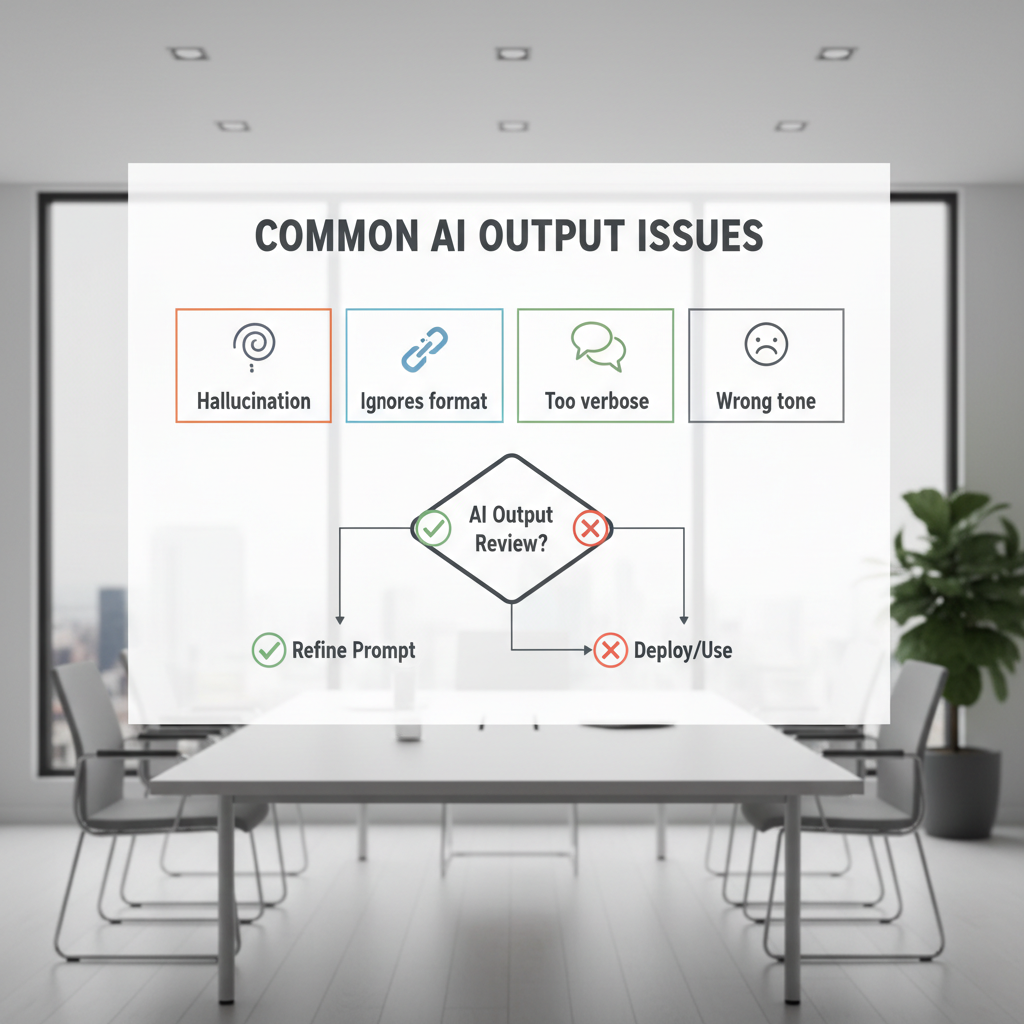
- If it invents details: Add “If you are not sure, say you are not sure” and require an “Assumptions” section.
- If it ignores format: Put the format at the end and make it strict, like “Output only a table with these columns.”
- If it gets too long: Give a hard limit and a structure: “6 bullets max, each under 18 words.”
- If the tone feels off: Provide a short sample paragraph in the tone you want and say “match this style.”
- If it misses your point: Ask it to restate your goal before answering, then continue only if correct.
When accuracy has real consequences, treat AI output as a draft. According to FTC guidance on AI, businesses should avoid deceptive or unsubstantiated claims, so it is smart to verify anything you might publish or use in customer-facing work.
Key takeaways and your next step
If you want better results quickly, focus on context, constraints, and output format, then add one improvement at a time. That is the most repeatable path to learning how to write chatgpt prompts without turning every request into a novel.
Action idea: pick one task you do weekly, write a reusable template prompt for it, and save it somewhere you can paste fast. After two or three runs, tweak only what caused the biggest mismatch, and you will feel the difference.